
Maximum Upload File Size in WordPress is the main destination of this topic. How to increase the Maximum Upload File Size in the WordPress media library is most important for the larger file system. It is based upon the large file like music, videos, presentation which is the large file from the limit of 2 MB.
How to Extend Maximum Upload File Size in WordPress

Maximum Upload File Size on MMM and all the WordPress blogs are of the file upload limit is only 2 MB. It requires to Maximum Upload File Size in every different work.
But, the default file upload size is more fit for the blogs. is not it!!
Mainly the site speed is more matter in today. So the compress or low size page will rank top of the search engine. Yes?
So, now why you still matter on the Maximum Upload File Size limit.
Yes, dear it is also our required things for large size files.
Read:
- How to Reset WordPress Password in CPanel
- How to Prevent WordPress From Generating Different Image Sizes
- How to Change The Publish Date on Your WordPress Post
I have also many sites on the WordPress platform by including the music site. These music sites required the Maximum Upload File Size in the media library.
The previous versions of WordPress was the extension in built position. As a result we were able to extended require amount of file size in it.
So, this Maximum Upload File Size now a major google topic or you may say the most important topic for everyone.
So, dear why this late to walk!
At first, you have to check your file upload limit and then proceed on your requirements.
I am going to take the example one of my music site, i. e. www.odia.tv
Let’s check the file upload limit in default.
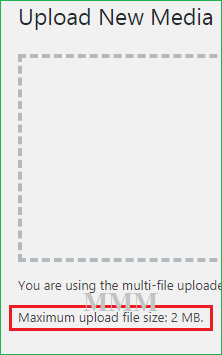
Here you can get the default WordPress upload limit. n the above view it is only 2 MB it is more for blogging platform.
is not it?
But for the field of music or you can take the large file system it is not appropriate. So we need the large amount of uploading file.
Let’s select a file which is more than that of the default on WordPress Media Library.
I mean, it is going to select a file which is more than that of 2 MB.
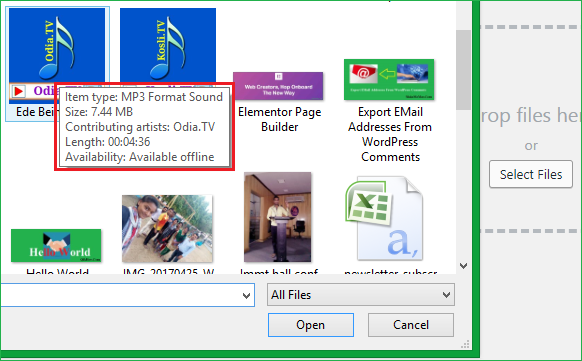
Ok, it is the size having 7.44 MB, that’s fulfil the criteria which have been on the way.
Let’s try to upload it and will see the result in media library.
What it say? What is this, take diversion below…

Oooo… ya it said that “it exceeds the maximum upload size for this site“.
What can I do now!! Cause it is my fully require to upload that file for the music purposes.
Now, are you hope there is no way to do it or solve it for any norms!! But there is a solution to do the way of this.
Say, how…
Ok, walk with me….
There are many types of ways to upload the large file system. Here I am going to explain the TWO methods only.
May be the others will be written very soon…
Method-1
Function File System for Maximum Upload File Size
On the theme editor you can find the function codes, now just add the some like…
@ini_set( ‘upload_max_size’ , ’97M’ );
@ini_set( ‘post_max_size’ , ’99M’ );
@ini_set( ‘max_execution_time’ , ‘300’ );
Noted That: the post max size always greater than that of upload max size.

Don’t forget to save and see the File edited successfully message.
Now, you are all set and will be able to upload max size file of about 97 MB. Your media library now showing you the max file upload limit to 97 MB.
That’s all you have done now.
Method-2
PHP Version Method for Maximum Upload File Size
In this method I am going to proceed for upload size of 100MB.
It is amazing that you can change upload file size limit on the panel of PHP version. It’s so simple and quick method for you as well as for me also.
Login your cPanel and Select PHP Version.

Now, you can proceed to upgrade or downgrade the PHP version here. As well as just one step ahead you will be able to extend the upload limit for the media library.

Here you have to choose the “switch to PHP options” which is located at the right upper corner of the page.
Now you are on the destination of Maximum Upload File Size extensions.

Here you have to change the three parameters
- max execution time 300
- post max size 128M (Here, but you can do it for your)
- upload max file size 100M
After that I got the result by screenshot below,

That’s all, which was your requirement.
Final Touch
The 2nd method is far better than the 1st. 2nd is no risk and no headache at all. Still, some prefer to do the 1st method in the WordPress dashboard section. But I am on the simple state on the 2nd method always.
Ok, success, now your turn… order me some Coffee, will take together. 🙂 🙂 🙂
I hope it is more helpful for your file extension purposes on the WordPress.
If you have any other ideas please don’t hide from me, tell on comment for betterment.



Nice post.
As you mention it is stop my haedache.
Thanks